Windows 11停止更新设置课程
- 浏览:
- |
- 更新:
在Win11系统里,我们可能不想要自动检测更新,但是不知道win11停止更新怎么设置,其实只要打开设置,在系统更新设置里面就可以停止更新了。
win11停止更新设置教程:
1、首先点开任务栏里的“开始菜单”

2、接着打开开始菜单里的“设置”
3、然后进入左下角的“Windows更新”
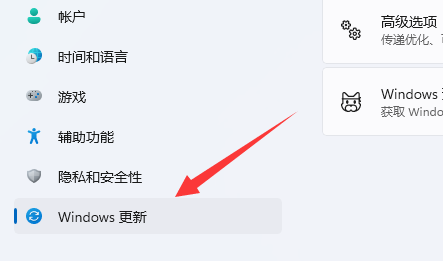
4、进入后,就能看到右边的“暂停更新”了。
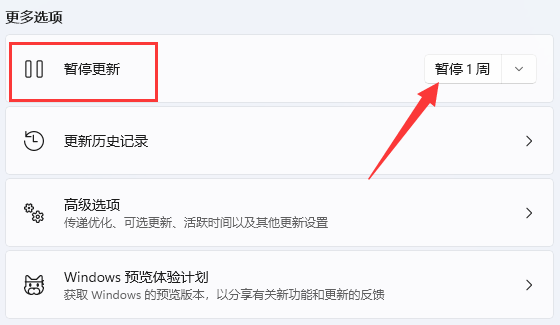
5、点开右边时间即可设置暂停时间,最多可以设置5周。

热门教程



- 1 Windows 7旗舰版原版32位 v
- 2 深度技术Windows 7 64位 优化
- 3 笔记本专用 Windows7 32位 装
- 5 深度技术 GhostWindows 7SP1x
- 6 Windows 7旗舰版英文 64位
- 7 最精简最快的Windows 7系统
- 8 深度技术Windows 7 32位纯净
- 9 新萝卜家园 Windows 7 X86 完
- 10 深度技术 Ghost Windows 7 64位
- 11 2025最新Windows7旗舰版镜像