Windows 7系统下360浏览器出现已取消该网页的导航如何解决?
- 浏览:
- |
- 更新:
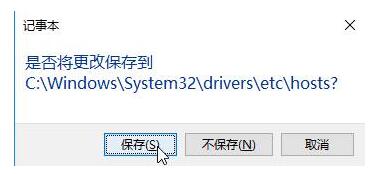
360浏览器是一款最安全的浏览器,很多win7系统用户喜欢使用360浏览器,可以使用浏览器中的导航网址来快速打开网站,可是最近有windows7旗舰版64位系统用户发现使用360浏览器的时候,提示已取消该网页的导航,该怎么办呢?现在给大家讲解一下具体的解决方法吧。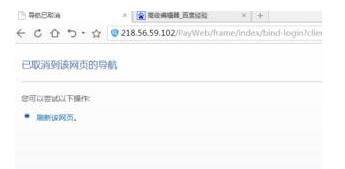 出现这样的情况,一般是由于网站本身原因比较大。下面小编给大家分享下解决方法。解决方法一:第一步、我们可以通过移动端或者其他PC机打开该网址导航测试,是否可以打开,如果打不开这说明是该网站本身存在问题,如果能打开,我们继续往下看;第二步、打开计算机,依次展开:c:windowssystem32driversetc ,在“etc”文件夹中找到“hosts”文件,单击右键,选择“打开方式”—点击“记事本”;第三步、将里面的内容全部删除,将下面这段代码复制进去:# Copyright (c) 1993-2009 Microsoft Corp. # # This is a sample HOSTS file used by Microsoft TCP/IP for Windows. # # This file contains the mappings of IP addresses to host names. Each # entry should be kept on an individual line. The IP address should # be placed in the first column followed by the corresponding host name. # The IP address and the host name should be separated by at least one # space. # # Additionally, comments (such as these) may be inserted on individual # lines or following the machine name denoted by a '#' symbol. # # For example: # www.xitontiandi.net# 102.54.94.97 rhino.acme.com # source server # 38.25.63.10 x.acme.com # x client host第四步、点击关闭按钮,在弹出的框中点击“保存”即可。
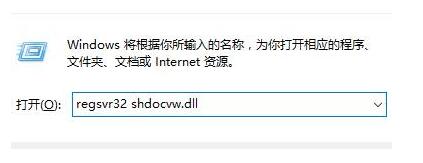
 方法二:若以上方法不行,请继续往下看第一步、按下“Win+R”呼出运行,在框中输入:regsvr32 actxprxy.dll 按下回车键;
 第二步、点击确定窗口,接着按下“Win+R”重新打开运行,输入:regsvr32 shdocvw.dll 按下回车键即可。
 关于Win7系统下使用360浏览器提示已取消该网页的导航如何解决就给大家介绍到这边了,碰到这样情况的用户们可以参照上面的方法步骤来操作吧。
热门教程



- 1 Windows 7旗舰版原版32位 v
- 2 深度技术Windows 7 64位 优化
- 3 笔记本专用 Windows7 32位 装
- 5 深度技术 Ghost Windows 7 64位
- 6 深度技术 GhostWindows 7SP1x
- 7 深度技术 Ghost Windows 7 64位
- 8 深度技术 Ghost Windows 7 32位
- 9 深度技术 Ghost Windows 7 64位
- 10 Windows 7旗舰版英文 64位
- 11 最精简最快的Windows 7系统